
Formula for Estimating the Cost of Developing an iPhone App
Key Factors Impacting iOS Development Cost
iOS App Size
Complexity of App Feature
Basic iOS App Features
Medium iOS App Features
Complex iOS App Features
App Category
iOS App Design
Wireframing
UI Design
Animation
AI Feature Integration
AI features are no longer a luxury. Businesses are adding them to stay competitive.
But they come at a cost. And that cost depends on what you want the AI to do.
Basic AI Features vs. Advanced AI Systems
A simple AI chatbot costs far less than a full recommendation engine. Why? Because the complexity is different.
A chatbot answers questions. A recommendation engine learns user behavior. It processes data. It updates itself. That costs more money and requires more time.
Here's a rough idea of what different AI features add to your iOS app budget:
- AI Chatbot – Adds $8,000–$20,000 depending on training data and integrations
- Recommendation Engine – Adds $15,000–$40,000 based on data complexity
- Predictive Analytics – Adds $20,000–$60,000 depending on data volume
- Voice Assistant – Adds $10,000–$30,000 based on language models used
- Smart Search – Adds $5,000–$15,000 for basic NLP-based search
These are estimates. Actual costs shift based on your app's scale.
What Drives AI Development Costs Up
Third-party APIs add recurring costs. Tools like OpenAI, Google AI, or AWS SageMaker charge per usage. They're fast to integrate but expensive long-term.
Custom model training is more expensive upfront. But you own the model. No ongoing API fees.
Cloud infrastructure adds to costs too. AI features need computing power. The more users, the more processing required.
Testing takes longer with AI. You need to test outputs, not just features. That adds hours to the timeline.
Maintenance is ongoing. AI models drift over time. Regular updates keep them accurate. Businesses frequently overlook this ongoing expense.
What Type of AI Feature Is Right for You?
If you're an early-stage startup, start with API-based AI. It's faster and cheaper to launch.
If you're scaling or handling sensitive data, custom models make more sense.
The key is to match the AI investment to your actual business need.
API Integrations
- Number of API: Each new API adds integrated development time and test attempts.
- Complexity of API: More advanced APIs, such as real-time updates (eg, Stock Tracking, Logistics), require more backend architecture, which increases costs.
- Customization Requirements: API requires customized workflow, data formatting or extended functions, it takes longer to use and test.
- The Quality of the Documentation: A poorly documented API slows down the development. Well-documented APIs reduce errors and speed up integration.
- Ongoing Maintenance and Support: The API may require updates over time to stay compatible with iOS updates or backend changes, leading to recurring costs.
Payment Gateway Integration Costs
Key Cost Driver
- Provider Options: Different Gateways offer different price models and features.
- Transaction Amount: You can qualify for high-volume discounts, but this can increase the total cost.
- Security compliance: Extra efforts and expenses are required to meet standards such as PCI DSS for secure transactions.
- Customization: Customizing the payment experience (eg, split payment, membership, tip functionality) increases the complication.
- Quick transfers: Services such as Apple Pay may charge fees for immediate money transfer.
Third-party API integration
- Third-party API integrates the necessary functionalities:
- Social Login (Facebook, Google, Apple Login)
- Map and navigation (Google Map, Mapbox)
- Analytics and Tracking (Firebase, Mix Panal)
- Chat/Messages (Twilio, Sendbird)
- Push Notification (OneSignal, Firebase Cloud Messaging)
Cost Consideration
iOS App Maintenance
Regular Updates
Fixes Bugs
Design Updates
Development Team Size
Development Team Location
iOS App Launch
Industry-Wise iOS App Development Cost Breakdown
App development costs are not the same for every industry. The features, rules, and user expectations are different.
Here's a breakdown by sector.
Healthcare Apps
Healthcare apps have strict rules. HIPAA compliance in the US and similar laws elsewhere add to the cost.
You need encrypted data storage. Secure user authentication. Integration with health records.
Estimated cost: $60,000–$250,000+
A basic appointment booking app costs less. A full telemedicine platform with video calls, prescriptions, and lab integration costs significantly more.
Taxi and Ride-Booking Apps
Real-time GPS, driver and rider apps, fare calculation, payment integration — these all add complexity.
You're essentially building two apps (driver + passenger) plus an admin panel.
Estimated cost: $50,000–$150,000
Ecommerce Apps
Ecommerce apps need a product catalog, cart, checkout, payment gateway, and order tracking.
Add push notifications, loyalty programs, or AR try-on features and costs go up.
Estimated cost: $40,000–$120,000
Food Delivery Apps
Similar to ride-booking but with restaurant management, real-time order tracking, and menu updates.
Multi-restaurant platforms are more complex than single-restaurant apps.
Estimated cost: $50,000–$130,000
Education Apps
Video streaming, quizzes, progress tracking, and certifications add layers of development work.
Apps with live tutoring or AI-based learning paths cost more.
Estimated cost: $30,000–$100,000
Fintech Apps
Banking, investment, or lending apps require the highest security standards. Regulatory compliance varies by country.
Biometric authentication, fraud detection, and real-time transaction processing all add cost.
Estimated cost: $80,000–$300,000+
Real Estate Apps
Property listings, map integration, mortgage calculators, and virtual tours are common features.
Apps that connect buyers, sellers, and agents directly cost more due to multi-role functionality.
Estimated cost: $40,000–$120,000
Social Media Apps
User profiles, feeds, messaging, media uploads, and notifications are core features.
Scaling social apps is expensive. Performance at high user volumes adds to backend costs.
Estimated cost: $60,000–$200,000
Why Costs Differ So Much Between Industries
Some industries require more compliance work. Others need more integrations.
Security requirements raise costs. Multi-role user systems raise costs. Real-time features raise costs.
Understanding your industry's specific requirements helps you set a realistic budget before development starts.
Hidden iOS App Costs That You Should Know Before Developing the App
Comprehensive Cost Comparison Between Android & iOS Apps
Cost overview
App Design
Development Tools and Language
Development Time
App Test Cost
App Store and Release Costs
So, Which is More Budget-Friendly?
From Idea to App Store: The Full Development Process With Costs
Most people have a great app idea. Very few know what happens between that idea and the final product sitting in the App Store.
Here's the full process — broken down simply, with real costs attached.
Discovery & Planning
Before writing a single line of code, you need a clear plan.
This phase covers:
- Defining your app's purpose
- Identifying your target users
- Researching competitors
- Listing must-have features for version 1
Why this matters: The most common reason apps exceed their budget is that they skip this stage.
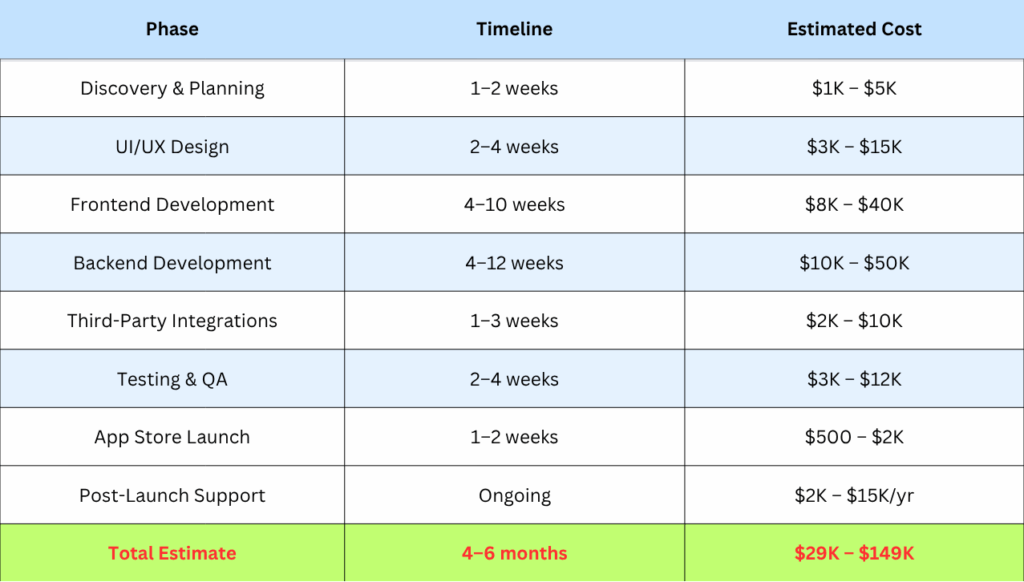
Time: 1–2 weeks 💰 Cost: $1,000 – $5,000
This is where your app gets its look and feel.
Designers create:
- Wireframes — basic layout sketches
- Clickable prototypes — a working model without code
- Final UI screens — colors, fonts, icons, and buttons
Good design = fewer user complaints later.
Time: 2–4 weeks 💰 Cost: $3,000 – $15,000
This is what users see and interact with on their screen.
Developers build
- Every screen of the app
- Buttons, animations, and transitions
- Smooth navigation between pages
Platform choices here matter
- Native (Swift for iOS / Kotlin for Android) — best performance
- Cross-platform (Flutter / React Native) — one code, both platforms, lower cost
Time: 4–10 weeks 💰 Cost: $8,000 – $40,000
Backend Development
The engine running behind your app — users never see it but always feel it.
This includes:
- Database setup
- User authentication (login/signup)
- APIs connecting the app to your server
- Push notifications
- Payment gateway integration
No backend = no data, no logic, no real app.
Time: 4–12 weeks 💰 Cost: $10,000 – $50,000
Third-Party Integrations
Most apps don't build everything from scratch — and they shouldn't.
Common integrations include:
- Payment: Stripe, PayPal, Razorpay
- Maps: Google Maps, Mapbox
- Login: Google, Apple, Facebook sign-in
- Analytics: Firebase, Mixpanel
- SMS/OTP: Twilio
Each integration saves weeks of development time.
Time: 1–3 weeks
Cost: $2,000 – $10,000
Testing & QA
Before launch — everything gets tested. Hard.
QA teams check:
- Bugs and crashes
- Slow loading screens
- Broken buttons or forms
- Security vulnerabilities
- Performance under heavy traffic
Skipping QA = bad reviews on day one.
Time: 2–4 weeks
Cost: $3,000 – $12,000
Time to go live — but it's not just clicking publish.
This step includes:
- App Store & Play Store submission
- Writing app descriptions and keywords
- Adding screenshots and preview videos
- Waiting for approval (Apple takes 1–3 days)
One rejection from Apple can delay your launch by a week. Plan ahead.
Time: 1–2 weeks
Cost: $500 – $2,000
Post-Launch Support & Maintenance
Launching is not the end point, rather, it marks the beginning.
After launch, you'll need:
- Bug fixes from real user feedback
- OS updates (iOS and Android update regularly)
- New feature rollouts
- Server monitoring and scaling
Budget 15–20% of your development cost every year for maintenance.
Ongoing
Cost: $2,000 – $15,000/year
Full Cost Breakdown at a Glance
Cost by Development Location
Where your team is based changes everything:
- USA / Canada — $100–$200/hr
- UK / Europe — $70–$150/hr
- India — $20–$50/hr
- Southeast Asia — $25–$60/hr
Same quality is possible at lower rates — if you vet your team properly.
Quick Tips Before You Start
- Build a simple version first (MVP) — don't overbuild in round one
- Get fixed-price quotes, not just hourly estimates
- Prior to revealing your concept, always sign an NDA.
- Ask for a portfolio and references from any agency you hire
- Set aside a 20% buffer on top of your budget for surprises
iOS App Development Cost Compared to Revenue Potential
Spending $80,000 on an iOS app sounds like a lot. But the right app can return that investment many times over.
The question isn't just "what does it cost?" It's "what will it return?"
How iOS Apps Generate Revenue
Subscriptions are the most reliable model. Users pay monthly or yearly. Revenue is predictable.
In-app purchases work well for apps with engagement loops — games, fitness, productivity tools.
Ecommerce integration turns the app into a direct sales channel. Many brands report higher conversion rates on mobile apps than websites.
Advertising revenue works for high-traffic apps. More users = more ad income.
Operational savings are often overlooked. An app that automates manual tasks reduces your running costs. That's indirect ROI.
Why iOS Users Drive Higher Revenue
iOS users tend to spend more. Studies consistently show higher in-app purchase rates on iOS compared to Android.
The App Store audience is global. A well-built app can reach customers in multiple countries without additional sales infrastructure.
Industries Where ROI Tends to Be Strong
Fintech – High transaction volumes mean strong revenue from small percentage fees.
Healthcare – Subscription-based telehealth platforms have strong retention rates.
Ecommerce – Direct sales + loyalty programs drive repeat purchases.
Education – Subscription models with strong content libraries build long-term recurring revenue.
Fitness – Premium users are willing to pay for personalized plans and progress tracking.
The Long-Term View
An app is not a one-time cost. It's a business asset.
Treat it like hiring a full-time sales and operations team. The upfront investment pays off over years, not months.
Businesses that think long-term tend to invest in scalable architecture from day one. That reduces rebuild costs later and supports growth without starting over.
Top Tips to Reduce
These are estimates. Actual costs shift based on your app's scale.
iOS App Development Cost
Start with a Minimum Viable Product (MVP)
Don't Leave the App Test
Consider Outsourcing Your iOS App Development
Monetization Strategies for Mobile App Development
Building an app is one thing, but making money with it is another. What is the good news? You have many of possibilities. Here are the tactics that do work:
Offer the app for free, but lock premium features behind a paywall.
- Users try before they buy
- Great for productivity and fitness apps
- Converts well when the free version delivers real value
In-App Purchases (IAP)
Let users buy virtual items, upgrades, or content inside the app.
- Works best for gaming and e-commerce apps
- Keep purchases feel worth it — not forced
- Small purchases add up to big revenue
Subscription Model
Charge users weekly, monthly, or yearly for continued access.
- Predictable and recurring revenue
- Best for tools, streaming, and news apps
- Offer a free trial to reduce hesitation
In-App Advertising
Show ads to free users and earn per click or impression.
- Use banner ads, interstitial ads, or rewarded video ads
- Rewarded ads perform best — users opt in willingly
- Avoid overloading ads or users will uninstall
Sponsorships & Brand Partnerships
Partner with brands relevant to your app's audience.
- A fitness app can partner with a supplement brand
- Feels less intrusive than regular ads
- Works well once you have a solid user base
Selling Physical or Digital Products
Use your app as a direct sales channel.
- Sell courses, templates, merch, or services
- E-commerce apps thrive with this model
- Great for creators and educators
White Labeling Your App
Build once, sell to multiple businesses under their brand.
- High upfront effort, high long-term reward
- Works well for booking, delivery, or service apps
- Each client pays a licensing or setup fee
Data Monetization
Share anonymized, aggregated user insights with third parties.
- Always stay compliant with GDPR and privacy laws
- Be transparent with users about data usage
- Not ideal for all apps — know your audience first
Why is iOS a Better Choice than Android?
Apptechies Smart Approach to iOS App Cost Planning
Building an iOS app without a cost plan is one of the most expensive mistakes a business can make.
Here's how smart planning helps you avoid budget overruns.
Start With an MVP
- An MVP (Minimum Viable Product) includes only the core features your users need.
- You launch faster. You spend less upfront. You test the idea in the real market.
- Then you add features based on actual user feedback — not assumptions.
- This approach saves money and reduces the risk of building something users don't want.
- Prioritize Features That Matter Most
- Not every feature needs to be in version one.
- List your features. Separate the must-haves from the nice-to-haves. Build the must-haves first.
- This keeps your initial budget focused. It also speeds up your launch timeline.
Use Scalable Architecture from Day One
- Building cheap and rebuilding later costs more than building right the first time.
- Scalable architecture means your app can handle 100 users or 100,000 users without a full rebuild.
- This is especially important for apps that expect growth — ecommerce, social, or marketplace platforms.
- Phased development lowers financial risk.
- Rather than investing the entire budget at once, divide development into phases.
Phase 1: Core features. Launch. Collect feedback.
Phase 2: Improve based on actual user behavior.
Phase 3: Implement advanced features that enable scaling.
- Each phase has a specific goal and a set budget. This maintains the project on schedule.
- Agile Development keeps costs predictable.
- Agile development entails working in small sprints. Usually two weeks each.
- At the end of each sprint, you evaluate what has been built. You can change the scope as needed.
- This avoids the common problem of paying for months of labor only to find out later that the guidance was inaccurate.
Plan for Ongoing Costs Too
Development is not the final cost. After launch, you'll need:
- Regular iOS updates (Apple releases new OS versions every year)
- Bug fixes and performance improvements
- Server and cloud infrastructure costs
- Feature updates based on user needs
Budgeting for post-launch maintenance from day one prevents surprises later.
These four sections are written to be read quickly, understood easily, and trusted — no fluff, no hype, just practical information that answers what business owners and decision-makers are actually searching for.